Terraform Core Concepts
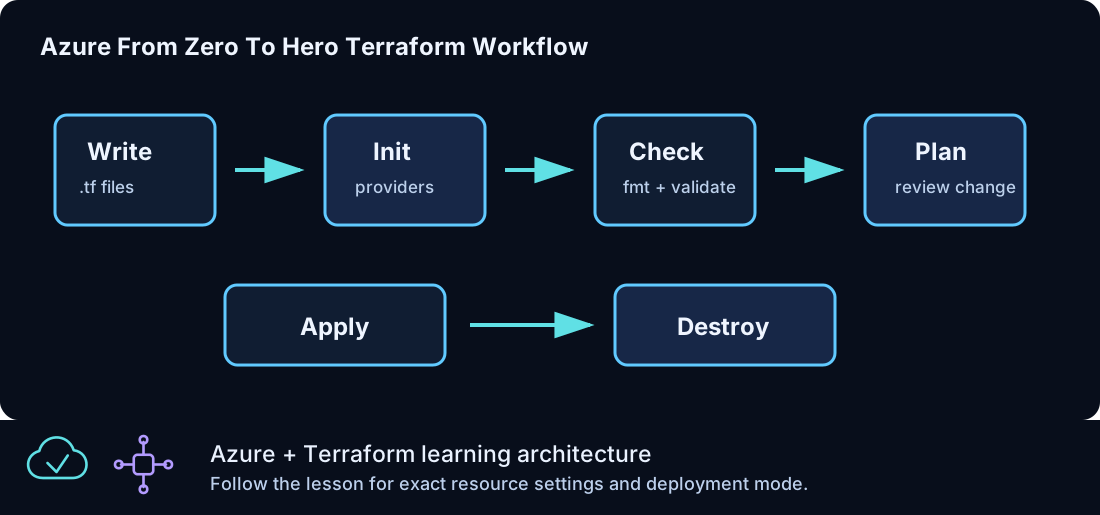
Terraform is the control loop for Azure From Zero To Hero. Each lesson describes the Azure resources that should exist, and Terraform compares that desired configuration against recorded state and live provider data. The result is a plan: a concrete list of resources to create, update, replace, or destroy. A good Terraform habit is not to memorize commands, but to understand what question each command answers.
This page is a field guide for the core Terraform ideas used throughout the curriculum. It explains how the files fit together, how the command workflow protects you from surprises, how variables and outputs shape each lesson, and how to read the plan before you apply it. The examples are intentionally aligned with the Windows-only Azure labs in this repository.
The Mental Model
Terraform works with three views of the world:
| View | Description | Example |
|---|---|---|
| Configuration | The .tf files you write |
azurerm_resource_group.lab should exist |
| State | Terraform's record of managed objects | The resource group has an Azure resource ID |
| Provider data | What Azure reports right now | The resource group exists in eastus2 |
When all three views agree, Terraform has nothing to change. When configuration and state differ, Terraform builds a plan to make the target match the configuration. If a resource was changed outside Terraform, the provider refresh step can reveal drift. That is why plan review matters: it is the moment where Terraform shows what it thinks needs to happen.
In Azure From Zero To Hero, each lesson folder is a small Terraform project. The project boundary is intentional. It lets you practice one concept at a time, run cleanup safely from the same folder, and avoid mixing state from unrelated lessons. Later lessons introduce remote state and modules, but the basic workflow stays the same.
Standard Command Flow
| Command | What it answers | When to run it |
|---|---|---|
terraform init |
Can this folder use the required providers and modules? | First run, and after provider, module, or backend changes |
terraform fmt -check |
Are the files consistently formatted? | Before validation and before committing |
terraform validate |
Is the Terraform configuration structurally valid? | Before every plan |
terraform plan -out tfplan |
What will Terraform change? | Before every apply |
terraform apply tfplan |
Make the reviewed plan real | Only after plan review |
terraform output |
What values should I use for validation? | After apply |
terraform destroy |
Remove resources in this state | End of each lesson |
The saved plan file, tfplan, is useful because the apply step uses the exact plan you reviewed. Without a saved plan, Terraform recalculates the plan during apply. That can still be valid, but it is less disciplined for learning and review.
Why Every Lesson Has The Same File Shape
The lesson folders use a consistent structure so that you can move quickly without guessing where a setting lives.
| File | Purpose |
|---|---|
versions.tf |
Defines the required Terraform version and providers |
providers.tf |
Configures the AzureRM provider |
variables.tf |
Declares inputs that can change per run |
locals.tf |
Builds derived names, compact prefixes, and standard tags |
resource-group.tf |
Creates the lesson resource group |
lesson-specific .tf file |
Contains the main resources for that lesson |
outputs.tf |
Prints values needed for validation or later lessons |
terraform.tfvars.example |
Shows safe input examples |
This pattern prevents each lesson from becoming a different puzzle. When a lab needs a VNet, the network file contains the VNet. When a lab needs a Windows VM, the compute file contains the VM. When a lab needs Azure SQL, the Azure SQL file contains that service. The predictable shape is part of the curriculum.
Provider Configuration
Terraform itself does not know how to create Azure resources. It calls the AzureRM provider. The provider translates Terraform resource definitions into Azure API operations.
A typical lesson has this provider block:
The features {} block is required by the AzureRM provider. The subscription_id input is optional in the examples, but it is valuable when you use more than one Azure subscription. Explicit subscription selection prevents accidental deployment to the wrong account.
The related variable is defined as:
variable "subscription_id" {
  description = "Azure subscription ID. Leave null to use the active Azure CLI subscription when supported."
  type        = string
  default     = null
}
If your environment requires an explicit subscription, put it in a local terraform.tfvars file. Do not commit that local file.
Resources And Addresses
A Terraform resource has a type and a local name:
resource "azurerm_resource_group" "lab" {
  name     = "${local.prefix}-rg"
  location = var.location
  tags     = local.tags
}
The full Terraform address is azurerm_resource_group.lab. Terraform uses that address in the plan, in state, and in references from other resources. The Azure resource name is different. In this example, the Azure name is derived from local.prefix, such as clz-dev-clz100-rg.
That distinction matters. The Terraform address is how Terraform tracks the object. The Azure name is what you see in the portal and CLI. Renaming either one can have consequences. Renaming the Terraform local name changes the state address. Renaming the Azure resource name often forces replacement because many Azure resources cannot be renamed in place.
Variables
Variables are inputs. They make one configuration reusable without editing the .tf files for every environment. Azure From Zero To Hero uses common variables for environment, location, prefix, lesson ID, administrator name, instance count, and optional service settings.
Good variables have three traits:
| Trait | Why it matters |
|---|---|
| Clear description | The user knows what the value controls |
| Specific type | Terraform can catch wrong input shapes |
| Safe default | A new lab user can run a lesson without inventing every value |
Example:
variable "environment" {
  description = "Deployment environment name."
  type        = string
  default     = "dev"

  validation {
    condition     = contains(["dev", "test", "prod"], var.environment)
    error_message = "Use dev, test, or prod."
  }
}
Validation blocks are useful when the wrong value would create confusing names or unsafe resources. The lab keeps validation simple so the learning path stays focused.
Local Values
Locals are derived values. They keep expressions in one place and make resources easier to read.
locals {
  lab_id   = "CLZ-150"
  lab_code = lower(replace(local.lab_id, "CLZ-", "clz"))
  prefix   = lower("${var.name_prefix}-${var.environment}-${local.lab_code}")

  tags = {
    Project     = "Azure From Zero To Hero"
    Environment = var.environment
    ManagedBy   = "Terraform"
    Lab         = local.lab_id
  }
}
The most important local values in this repository are local.prefix and local.tags. They create consistent resource names and consistent ownership metadata. When you inspect Azure resources later, tags help you identify which lesson created them and whether they are safe to remove.
Outputs
Outputs expose values after Terraform creates resources. They are not just for convenience. They are the bridge between apply and validation.
Examples:
output "resource_group_name" {
  description = "Resource group created by this lab."
  value       = azurerm_resource_group.lab.name
}
For sensitive values, outputs must be marked sensitive:
output "windows_admin_password" {
  description = "Generated Windows admin password."
  value       = random_password.windows_admin.result
  sensitive   = true
}
Sensitive outputs are still stored in state. Marking an output sensitive only controls display behavior. That is why state handling and local file hygiene matter.
Data Flow Inside A Lesson
Most Azure From Zero To Hero lessons follow this flow:
- Variables accept user-controlled values like environment and region.
- Locals combine those values into names and tags.
- The resource group uses the computed name and location.
- Lesson-specific resources refer to the resource group, subnets, secrets, or service IDs.
- Outputs expose the values needed to validate the lab.
This flow makes the files easy to reason about. For example, a Windows VM needs a network interface. The network interface needs a subnet. The subnet needs a VNet. The VNet needs a resource group. Terraform builds a dependency graph from those references and then creates resources in a workable order.
Dependency Graph
Terraform usually infers dependencies automatically. If one resource references another resource's attribute, Terraform knows the referenced resource must exist first.
Example:
resource "azurerm_network_interface" "web" {
  name                = "${local.prefix}-web-nic"
  location            = azurerm_resource_group.lab.location
  resource_group_name = azurerm_resource_group.lab.name

  ip_configuration {
    name                          = "internal"
    subnet_id                     = azurerm_subnet.web.id
    private_ip_address_allocation = "Dynamic"
  }
}
This network interface depends on the resource group and subnet because it references them. You do not need to add explicit dependency metadata in normal cases.
Use explicit dependencies only when there is no direct attribute reference but there is still a real ordering requirement. Overusing explicit dependencies makes the configuration harder to read and can slow down plans.
Plan Reading
Plan review is a skill. Do not treat the plan as a wall of text. Look for a few key signals:
| Signal | What to check |
|---|---|
| Resource count | Does the number of resources match the lesson goal? |
| Actions | Are resources being created, updated, replaced, or destroyed? |
| Names | Do names start with the expected prefix? |
| Region | Is the location correct? |
| Tags | Are standard tags applied where supported? |
| Replacements | Is Terraform replacing something you expected to keep? |
The most important plan symbols are:
| Symbol | Meaning |
|---|---|
+ |
Create |
~ |
Update in place |
-/+ |
Replace |
- |
Destroy |
In a new lesson, a create-heavy plan is normal. In a later maintenance run, unexpected replacement is a warning. Stop and understand it before applying.
State And Drift
State is Terraform's memory. If someone changes an Azure resource outside Terraform, the next plan may show a difference between state, configuration, and provider data. That difference is called drift.
Drift is not always bad. Sometimes it reveals a real manual fix. Sometimes it reveals an accidental change. In either case, Terraform needs a decision: should the configuration be updated to match the manual change, or should Terraform restore the configured shape?
Azure From Zero To Hero keeps each lesson small so drift is easy to understand. If a resource in CLZ-220 changes, you know the load-balancer lesson owns it. The Lab tag also helps identify ownership in Azure.
Modules
A module is a reusable Terraform package. Every lesson folder is technically a root module. Later in the curriculum, the capstone calls local child modules from the modules folder.
Use modules when:
| Use a module when | Avoid a module when |
|---|---|
| A pattern is repeated with real variation | The resource appears only once |
| The module has a clear interface | The inputs are more confusing than the resources |
| It makes the capstone easier to read | It hides important learning details too early |
This repository delays modules until the lab user understands the raw resources. That sequence makes the module interface easier to trust.
Formatting And Validation
Run formatting before validation:
Formatting changes whitespace and alignment. It does not prove the design is correct, but it keeps review noise low. Validation checks syntax, provider schema, references, variables, and many structural errors. It does not call every Azure service in the same way a full plan does, so validation is necessary but not sufficient.
The repository workflow runs formatting and validation across lesson folders. Local validation is still useful before committing.
Safe Local Values
Each lesson includes terraform.tfvars.example. It is safe to commit because it contains placeholder or non-secret values.
If you need real local values, create terraform.tfvars:
environment     = "dev"
location        = "eastus2"
subscription_id = "00000000-0000-0000-0000-000000000000"
admin_cidr      = "203.0.113.10/32"
The .gitignore file excludes terraform.tfvars. Keep it that way. Real subscription IDs may not be secret in the strictest sense, but they are still local operational details that do not belong in a reusable lab repository.
Common Beginner Mistakes
| Mistake | Better habit |
|---|---|
| Applying without reading the plan | Save and review the plan first |
| Running destroy from the wrong folder | Destroy from the lesson that created the state |
| Editing generated state | Change configuration, then plan |
| Committing local values | Commit examples only |
| Changing names after apply | Expect replacement unless Azure supports rename |
| Ignoring sensitive outputs | Remember sensitive values still exist in state |
How To Approach A New Lesson
Start with the README, then read the .tf files in this order:
versions.tfproviders.tfvariables.tflocals.tfresource-group.tf- The lesson-specific resource file
outputs.tf
Then run the standard command flow. If the plan surprises you, go back to the resource file and trace each reference. Most Terraform learning comes from following those references until the graph makes sense.
Summary
Terraform is reliable when you keep the loop disciplined: write clear configuration, initialize the folder, format, validate, plan, review, apply, validate in Azure, and destroy when the lesson is complete. Azure From Zero To Hero repeats that loop in every lesson so that the command sequence becomes automatic and the architecture concepts can take center stage.