CLZ-160 - State and Locking Basics
Goal
Inspect how Terraform binds configuration addresses to an Azure object, and practice safe state ownership before moving to a shared backend.
Prerequisites
- Complete CLZ-150.
- Use only this lesson folder for its apply and destroy operations.
Architecture
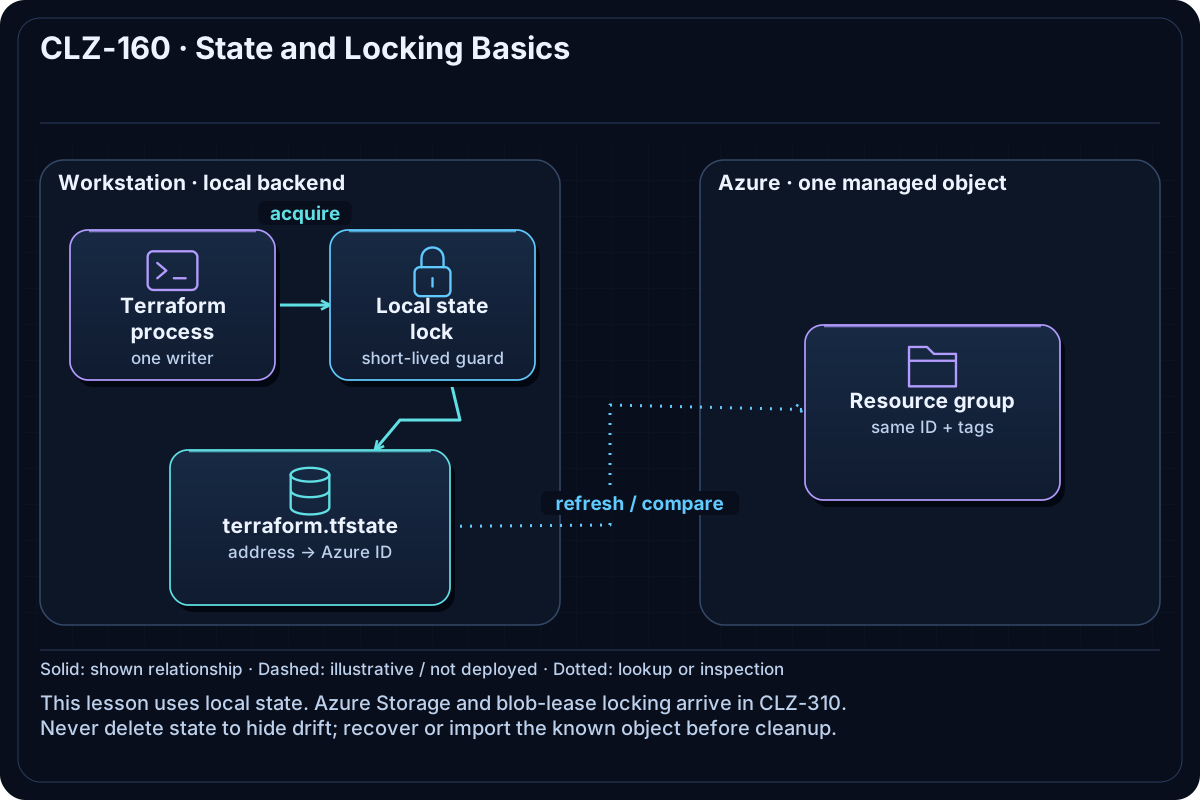
One resource group is recorded in local terraform.tfstate. Terraform refreshes it through AzureRM before calculating changes. The state file is local for teaching purposes; CLZ-310 later introduces an Azure Storage backend and locking.
Resources And Cost
Relative cost: Low. The resource group has no direct charge; local state uses workstation storage.
| Component | Purpose and principal cost driver |
|---|---|
| Tagged resource group | A simple real object for state inspection. |
| Local state | Maps azurerm_resource_group.lab to its Azure resource ID. |
| State lock | A short-lived local lock prevents concurrent writes in this folder. |
Inputs
| Input | Required substitution or decision |
|---|---|
subscription_id |
Required for Azure plan, apply, and destroy; copy the exact ID returned by Azure CLI. |
environment |
Keep dev for the lab or choose test/prod only to study the naming boundary. |
location |
Use a region where your subscription has access and sufficient quota. |
name_prefix |
Use a short lowercase prefix; resource names derive from it. |
Keep real subscription IDs, CIDRs, and secrets in untracked terraform.tfvars or environment variables.
Deploy

Run from the repository root in PowerShell 7:
Set-Location CLZ-160-state-and-locking-basics
if (-not (Test-Path terraform.tfvars)) {
  Copy-Item terraform.tfvars.example terraform.tfvars
}
$subscriptionId = az account show --query id --output tsv
terraform init -lockfile=readonly
terraform fmt -check
terraform validate
terraform plan -var "subscription_id=$subscriptionId" -out tfplan
terraform show tfplan
terraform apply tfplan
Validate
terraform state list
terraform state show azurerm_resource_group.lab
terraform show -json | ConvertFrom-Json | Select-Object -ExpandProperty values
git status --short
Expected result:
- Exactly one managed address is listed.
- State shows the same resource ID and tags as Azure.
- Git does not list state, plan, or
.terraformruntime data as tracked content.
Troubleshooting

| Symptom | Resolution |
|---|---|
| Terraform reports a state lock | Stop the other Terraform process; use force-unlock only after proving the lock is stale. |
| State and Azure disagree | Run terraform plan to refresh; do not edit state JSON by hand. |
| State was deleted while the resource remains | Recover the state backup or import the known object before attempting cleanup. |
Cleanup

$resourceGroup = terraform output -raw resource_group_name
terraform destroy -var "subscription_id=$subscriptionId"
terraform state list
az group exists --name $resourceGroup
State is empty and Azure CLI returns false. Keep the committed dependency lockfile.
Production Delta
- Store team state in a protected remote backend with Azure AD authorization, locking, network controls, versioning, and recovery.
- Separate state by environment and restrict who can read it because state may contain secrets.
Exercises
- Open two terminals and observe how locking protects a state-changing operation without forcing a stale lock.
- Compare the resource ID in
terraform state showwithaz group show.
Navigation
← CLZ-150 - Variables, Locals, and Outputs | Curriculum | CLZ-170 - Virtual Network Foundation →