CLZ-290 - Private DNS
Goal
Create an internal DNS namespace, link it to a VNet, and distinguish successful Azure control-plane configuration from name resolution observed inside that VNet.
Prerequisites
- Complete CLZ-280.
- Understand that Azure Private DNS zones are visible only to linked networks and their connected resolvers.
Architecture
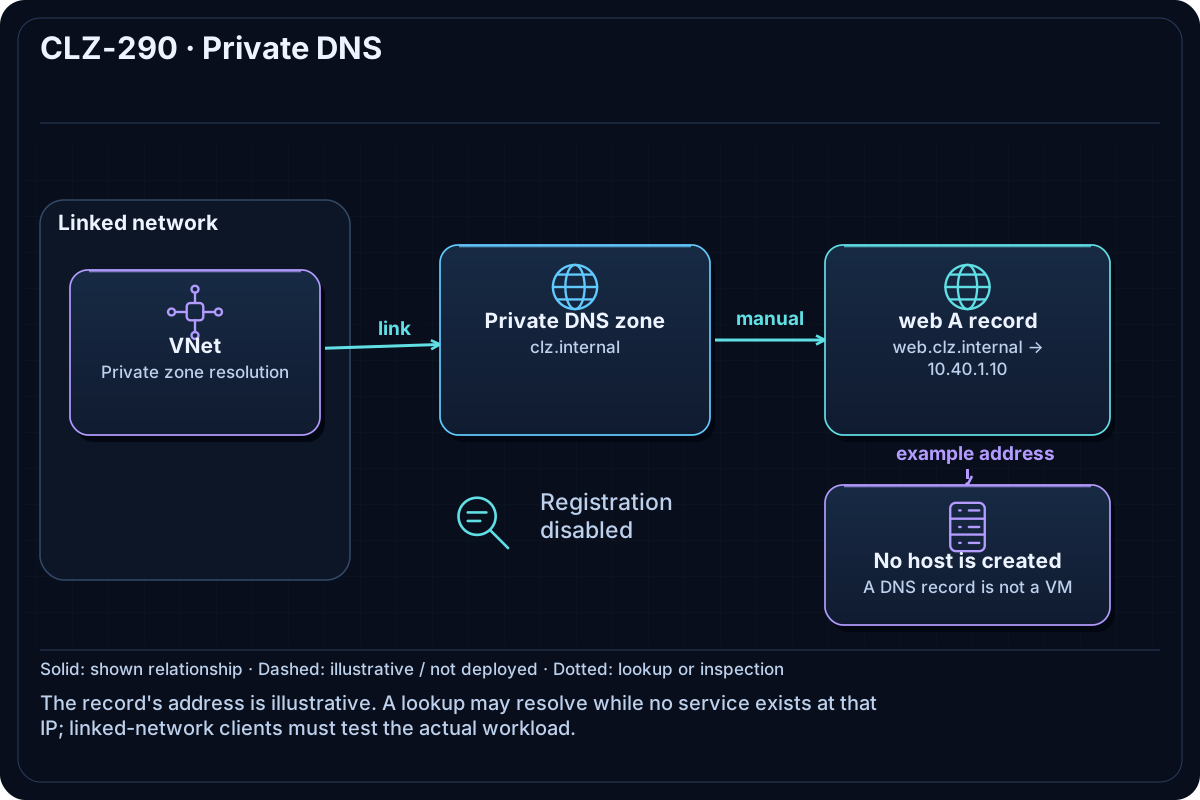
The clz.internal Private DNS zone is linked to the lesson VNet without auto-registration. A web A record maps to 10.40.1.10. The record demonstrates DNS behavior; no VM is created at that address.
Resources And Cost
Relative cost: Low. Private DNS zones and queries are low cost; the VNet and subnets have no direct hourly charge.
| Component | Purpose and principal cost driver |
|---|---|
| Private DNS zone | Internal clz.internal namespace. |
| VNet link | Makes the zone resolvable from the linked VNet. |
| A record | web.clz.internal maps to a teaching-only private address. |
| VNet and subnets | Resolution scope; no validation VM is deployed. |
Inputs
| Input | Required substitution or decision |
|---|---|
subscription_id |
Required for Azure plan, apply, and destroy; use the exact subscription GUID. |
environment |
Keep dev for the lab unless testing another environment boundary. |
location |
Select a supported region with sufficient quota. |
name_prefix |
Use a short lowercase prefix. |
Keep real subscription IDs, CIDRs, domains, endpoint names, and secrets in untracked local files or environment variables.
Deploy

Run from the repository root in PowerShell 7:
Set-Location CLZ-290-private-dns
if (-not (Test-Path terraform.tfvars)) {
  Copy-Item terraform.tfvars.example terraform.tfvars
}
$subscriptionId = az account show --query id --output tsv
terraform init -lockfile=readonly
terraform fmt -check
terraform validate
terraform plan -var "subscription_id=$subscriptionId" -out tfplan
terraform show tfplan
terraform apply tfplan
Validate
$resourceGroup = terraform output -raw resource_group_name
$zone = terraform output -raw private_dns_zone_name
az network private-dns zone show --resource-group $resourceGroup --name $zone --query '{name:name,records:numberOfRecordSets}' --output table
az network private-dns record-set a show --resource-group $resourceGroup --zone-name $zone --name web --query 'aRecords[].ipv4Address' --output tsv
# Run only on a VM in the linked VNet:
Resolve-DnsName web.clz.internal
Expected result:
- Control plane: Azure reports the zone, VNet link, and A record
10.40.1.10. - Data plane: a client using Azure-provided DNS inside the linked VNet resolves
web.clz.internalto10.40.1.10. - A normal Internet-connected laptop is not expected to resolve the private zone.
Troubleshooting

| Symptom | Resolution |
|---|---|
Azure CLI shows the record but Resolve-DnsName fails |
Run the query inside the linked VNet and check custom DNS forwarding/link scope. |
| The name resolves but no service responds | The record is illustrative and no workload owns 10.40.1.10 in this lesson. |
| A custom DNS server is used | Configure an Azure DNS Private Resolver or conditional forwarding for the private zone. |
Cleanup

$resourceGroup = terraform output -raw resource_group_name
terraform destroy -var "subscription_id=$subscriptionId"
az group exists --name $resourceGroup
The zone, link, record, and network are deleted.
Production Delta
- Use approved private namespaces and resolver/forwarding architecture; avoid names that collide with public or Active Directory DNS.
- Automate records from service ownership, monitor resolution, and define cross-VNet/on-premises forwarding explicitly.
Exercises
- Add an
apprecord and validate it from an in-VNet client. - Explain why an Azure portal screenshot proves control-plane state but not data-plane resolution.
Navigation
← CLZ-280 - NAT Gateway Outbound | Curriculum | CLZ-300 - Optional Public DNS →