CLZ-140 - Resource Groups and Tags
Goal
Create a predictable Azure resource-group boundary and use consistent tags for ownership, environment, management source, and lesson identity.
Prerequisites
- Complete CLZ-130.
- Permission to create and delete a resource group in the selected subscription.
Architecture
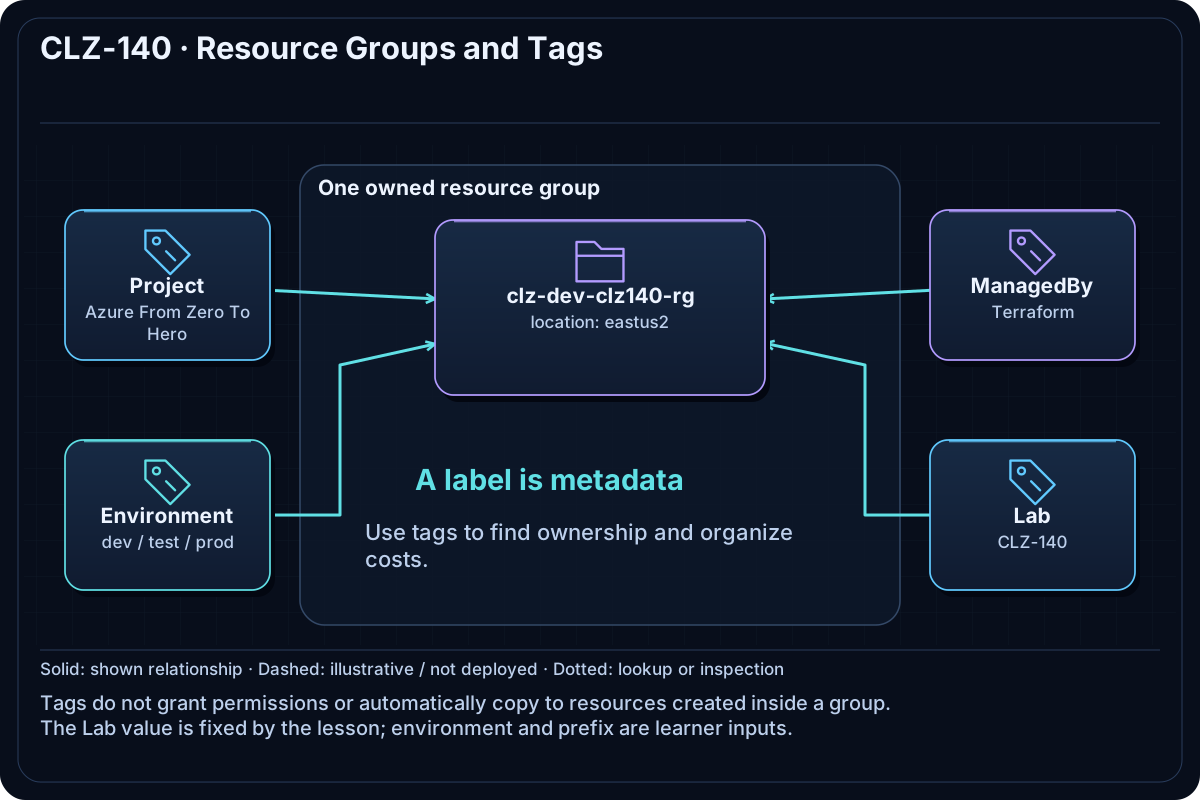
Four inputs feed fixed locals for the lesson ID, normalized prefix, and standard tag map. The resource group applies that metadata at the lifecycle boundary so cost, policy, and cleanup queries remain understandable.
Resources And Cost
Relative cost: Low. The empty resource group and tags have no direct charge.
| Component | Purpose and principal cost driver |
|---|---|
| Resource group | Groups the lesson lifecycle and establishes location metadata. |
| Tags | Project, Environment, ManagedBy, and Lab values used by later resources. |
Inputs
| Input | Required substitution or decision |
|---|---|
subscription_id |
Required for Azure plan, apply, and destroy; copy the exact ID returned by Azure CLI. |
environment |
Keep dev for the lab or choose test/prod only to study the naming boundary. |
location |
Use a region where your subscription has access and sufficient quota. |
name_prefix |
Use a short lowercase prefix; resource names derive from it. |
Keep real subscription IDs, CIDRs, and secrets in untracked terraform.tfvars or environment variables.
Deploy

Run from the repository root in PowerShell 7:
Set-Location CLZ-140-resource-groups-tags
if (-not (Test-Path terraform.tfvars)) {
  Copy-Item terraform.tfvars.example terraform.tfvars
}
$subscriptionId = az account show --query id --output tsv
terraform init -lockfile=readonly
terraform fmt -check
terraform validate
terraform plan -var "subscription_id=$subscriptionId" -out tfplan
terraform show tfplan
terraform apply tfplan
Validate
$resourceGroup = terraform output -raw resource_group_name
az group show --name $resourceGroup --query '{name:name,tags:tags}' --output json
az resource list --tag "Lab=CLZ-140" --query '[].name' --output tsv
Expected result:
- The group name follows
<prefix>-<environment>-clz140-rg. - All four standard tags are present with the expected values.
- The tag query can find the lesson boundary without relying on a portal search.
Troubleshooting

| Symptom | Resolution |
|---|---|
| A tag is missing after apply | Inspect local.tags and check whether an Azure Policy modified or denied the request. |
| The resource-group name differs from the README | Review only the four inputs; the lesson ID is fixed locally and is no longer configurable. |
| A tag query returns nothing | Use exact tag case and confirm the selected subscription. |
Cleanup

$resourceGroup = terraform output -raw resource_group_name
terraform destroy -var "subscription_id=$subscriptionId"
az group exists --name $resourceGroup
The group no longer exists. No separately owned resource should remain inside it.
Production Delta
- Add organization-specific owner, cost-center, data-classification, and expiration metadata.
- Enforce required tags with Azure Policy while preserving a documented exception process.
Exercises
- Add an
Ownerlocal tag in a temporary branch and inspect the in-place plan. - Query all learning resources by
Projectand then narrow the result byEnvironment.
Navigation
← CLZ-130 - Provider Authentication | Curriculum | CLZ-150 - Variables, Locals, and Outputs →